
New · Pro & Enterprise Edition
Upgrade Every Email
You Send.
BriefCatch, now in Outlook.
Catch wordiness, weak verbs, citation errors, and tone missteps—without leaving your inbox.
See how BriefCatch for Outlook can work for your team.
Available now · For BriefCatch Pro and Enterprise subscriptions
What's New · For Pro & Enterprise Teams
Powered by BriefCatch.
Trusted in Word. Built for Outlook.
Six things that make this release feel like the Word add-in you already trust — purpose-built for Pro and Enterprise teams.
Express editing
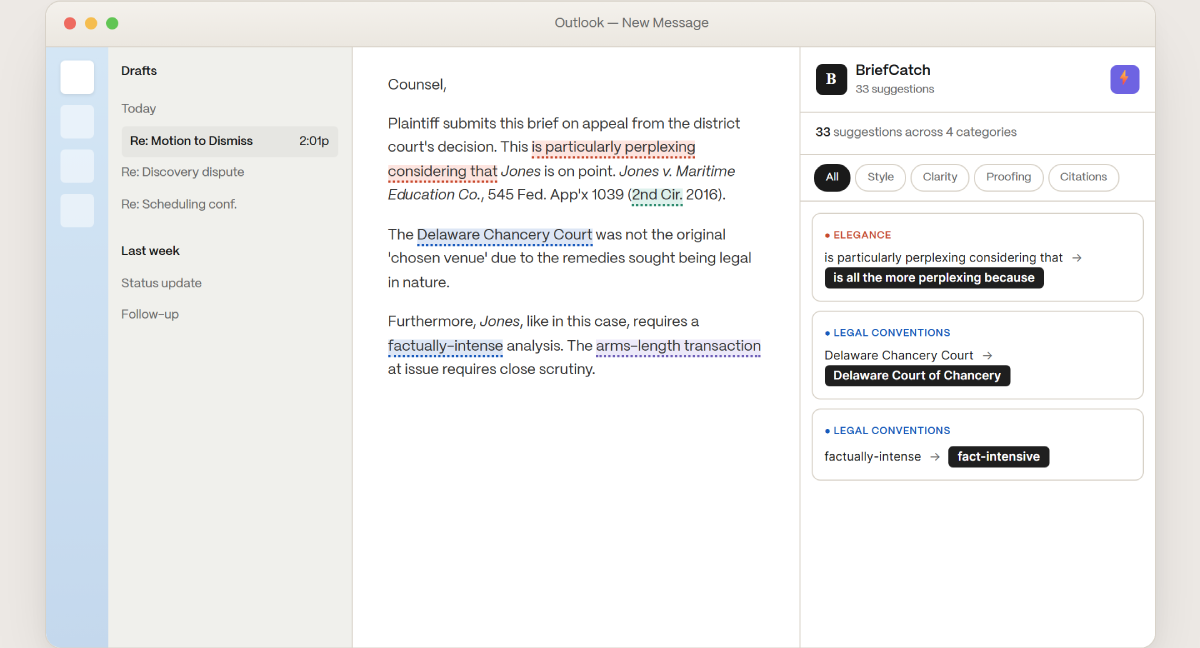
Accept every active suggestion in one click. The new lightning-bolt button applies all recommendations at once—turning review into a single decision.
Unified BriefCatch experience
Scores, Reports, and BriefChat are now available in Outlook, with the same trusted interface and writing engine you know from Word.
Inline highlights & underlines
See exactly where each suggestion applies in your email, color-coded by category for fast review.
Focused editing and pop-out view
Click any suggestion to open BriefCatch in a dedicated editor, automatically scrolled to the relevant text. Make edits in a focused workspace, then return to Outlook with one click.
Context-aware suggestions
Get feedback tailored to the message you're writing—from client communications to opposing counsel correspondence.
Zero data retention
Your text is processed in memory only. Nothing is stored, cached, or used for AI training—built for organizations with strict privacy requirements.
See it in Action
Expert eyes on every email.
Get trusted legal writing feedback that explains not just what to change, but why.
● LEGAL CONVENTIONS
Catch the small slips that erode credibility
Misnaming a court sends the wrong signal. BriefCatch catches conventions like proper court names, helping your emails reflect the precision legal professionals expect.
Citation form, court names, judge titles, abbreviations — all checked against established conventions, with a one-line explanation for every change.
Citation form, court names, judge titles, abbreviations — all checked against established conventions, with a one-line explanation for every change.
● IDIOMS
The phrase top advocates actually use.
"Factually intense" may sound plausible. Fact-intensive is the phrasing you'll find in briefs and opinions by legal writers like Justice Ginsburg and Seth Waxman. BriefCatch surfaces the idiomatic version with real examples, so you can see exactly why.
Every idiom suggestion includes examples from real opinions and briefs—not generic style advice.
Every idiom suggestion includes examples from real opinions and briefs—not generic style advice.
⚡ EXPRESS EDITING
Triage every suggestion in one click.
The new lightning-bolt button accepts every active suggestion in the panel at once. For long emails or draft backlogs, Express Editing turns minutes of review into a single decision.
Want more control? Review and accept individual suggestions first, then apply the rest in bulk.
Want more control? Review and accept individual suggestions first, then apply the rest in bulk.
“An email to a judge's chambers is a brief in miniature.”
Every message you send carries professional weight. The same writing intelligence that catches issues in your filings now catches them in your inbox — wordiness, weak verbs, citation slips, tone misses. Without breaking your workflow.
Trusted by Top Firms
From filings to email. Same trusted standard.
3 million BriefCatch edits and counting — across AmLaw 200 firms, government counsel, and the federal judiciary.
3M+
BriefCatch edits across AmLaw 200 firms
300+
Firms, including 45+ AmLaw 200 firms
100%
Word, Outlook, and online deployment coverage
25K+
Writing rules informed by top advocates and judges
Get Started · Pro & Enterprise
Bring BriefCatch to your firm's inbox.
BriefCatch for Outlook is available exclusively for Pro and Enterprise subscriptions. Two paths depending on where you are today.
Already a BriefCatch Pro or Enterprise customer?
Your team can get the Outlook add-in in three steps.
- Speak with your account team to confirm Outlook is included in your subscription
- Your IT admin deploys the add-in centrally through Microsoft 365 — or users install it from the Outlook Apps store
- Sign in with existing BriefCatch credentials — same single sign-on, same workflow

Want BriefCatch for Outlook at your firm?
Speak with sales to scope a subscription that includes the Outlook add-in.
- Book a 20-minute call with our team
- We scope a subscription tailored to your firm — BriefCatch for Word and Outlook together
- Centralized deployment, single sign-on, and onboarding support included

BriefCatch for Outlook — Pro & Enterprise Edition:
.svg)
Centralized deployment
Deployed through your Microsoft 365 admin center. Single sign-on. Same credentials your team already uses for BriefCatch.
Express Editing
One-click acceptance of every active suggestion. The lightning-bolt button applies all panel suggestions to your draft at once.
BriefCatch at parity
Scores, Reports, and BriefChat — the same intelligence as the Word add-in, now in your inbox.
Inline Highlights & Underlines
Color-coordinated suggestions in the email body so you can scan and triage at a glance.
Context-Aware Suggestions
Tailored feedback for the kind of message you're writing — emails, motions, briefs, or contracts.
Flexible Deployment
Self-serve install or centralized rollout through the Microsoft 365 admin center.
Zero Data Retention
Text is processed in RAM only. Nothing is stored, cached, or used for AI training.
Premium Support
Direct access to our customer success team — onboarding, training, and ongoing support.
Bring BriefCatch for Outlook to your firm
We employ best practices and adhere to industry standards in security and privacy, ensuring compliance with recognized general frameworks.
.svg)

.svg)
Thank you! Your submission has been received!
Oops! Something went wrong while submitting the form.

.svg)